Author Archives: Leslie Miller

Healthy Travel Checklist

Presented by the RFP® Valet Team

Following a particularly infectious flu season, many will come in contact with travelers this Spring.
To avoid a trip to urgent care, here is a checklist to stay healthy—or at least feel better.

HYDRATION: Increasing your water intake while traveling will keep you hydrated in a dry environment and healthy. 

MEDICINE BAG: Pack a small assortment of pain relievers, band-aids, antacids, and anything you may need. Since it’s common to be congested after a flight, pack saline solution for cleansing and fluticasone for inflammation. 

HAND SANITIZER: We touch several dirty surfaces while traveling. Keep it handy and use it often.

SLEEP: Sleep is essential for recovery. Without it, our hormones and immune system break down. Sleep aids like a white noise app, stickers to block blinking lights, or a light-blocking eye mask will help.  

VITAMIN E & ZINC: Supplements provide added support when healthy food options are limited.

Bonus Tips to Go the Extra Mile

WIPE DOWN SURFACES: Airplanes, hotel rooms, and public transit surfaces can harbor germs. Bring antibacterial wipes to clean armrests, tray tables, remote controls, and light switches before use.

SNACK SMART: Avoid processed airport snacks. Pack immune-boosting options like nuts, dried fruit, or granola bars to keep your energy up and your system supported.

MOVE AROUND: Long periods of sitting—whether on a flight or at a conference—can impact circulation and energy.
Make time to stretch, walk, or do light movement every couple of hours.

Stay safe, stay smart, and happy travels!
Audience-Focused Tips

Presented by the RFP® Valet Team

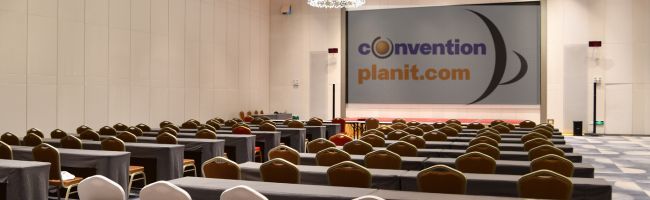
This sequel to last month’s Audience-Focused Fundamentals, presents seating ideas that will center attention on your audience. Most organization members say they attend conferences to learn something new and network with peers.

Here are some room set-up tips to advance audience participation and satisfaction.

  • Because no one wants to sit in the first row, position the podium against the long wall to shorten the distance between the attendees in the back row and presenter.
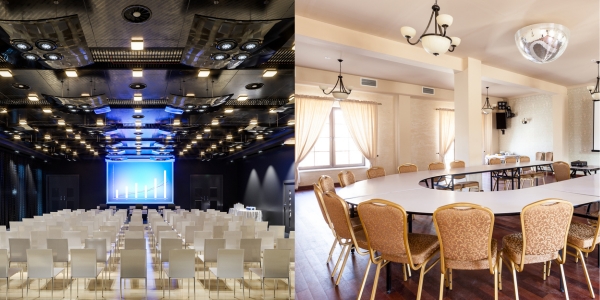
  • Curve your seating half-moon style so attendees can see each other. Make sure all chairs are facing the presenter.
  • Aisles should be set at 10:30 and 1:30, with a narrow aisle cut into the middle from the back to roughly the third row for welcoming and unobtrusive seating access.
  • Instead of an aisle behind the last row, place the last row of chairs against the back wall with ample leg room for attendees to walk through and take a seat. 
  •  Go Modular: Use Movable FurnitureOpt for chairs that are easy to rearrange. Sessions can shift from lecture to workshop style, so seating should flex with the format. Bonus: rearranging a room energizes attendees and keeps them alert.
  • Ditch the “Chair Parade”Avoid long, uninterrupted rows of chairs—it discourages interaction. Break rows into sections of 6–8 chairs with mini-aisles in between. People are more likely to chat with their “pod,” and it makes late arrivals less disruptive.
  • Standing Zones & Lean BarsFor quick sessions or networking-heavy events, integrate standing zones or high-top tables. This adds energy and encourages more fluid conversation (also a win for folks with back issues!).
  • Use Lighting to Set the ToneSoft spotlighting on the presenter is great, but don’t leave the audience in the shadows—literally. A warmly lit room makes people feel more comfortable and alert. Avoid full blackouts unless you’re screening videos (not horror movies).
  • Sound Check Their ExperienceMake sure the presenter’s mic is audible from every corner. Bad sound is the fastest way to lose your audience (second only to bad coffee). Consider adding ceiling or side speakers in wider rooms.
  • Facilitate Flow: Mind the Exit RoutesMake sure your setup allows attendees to easily slip out for calls or breaks without creating a scene. Bonus: If people don’t feel trapped, they’re actually more likely to stay engaged.

Who are your Knights of the Round Table?

suit of armor with helmet, hand and sword visible.

Presented by Katherine S. Markham, CHME, ConventionPlanit.com

In Gary Hernbroth’s groundbreaking book, Twist the Familiar, he advises that like King Arthur of Camelot, we must all assemble our own Round Table of support professionals. 

As Chief Motivating Officer for Training for Winners – a sales training company, the following excerpts focus on improving all aspects of one’s sales career, including career development. “Essentially, I believe we all need to have  our own Knights of the Round Table, in one way or another. We need to have an inner circle of people we can draw support from, bounce ideas off of, and share our thoughts, dilemmas, or crises we are facing.”  He suggests writing down 5-10 professional colleagues who you would call in a pinch for intelligent advice and cultivating these relationships. 

“We need people around us who can be honest sounding boards for us. ” Having truthful supporters versus those who simply tell you what you want to hear will put you on solid ground. “Confident, self-assured people and true leaders are brave enough to surround themselves with people who bring value to the table, whether they always agree or not.” And raises the question, “Who’s Round Table are you on?”     

For a deeper look into the ideas shared here, take a moment to read this insightful review of the book that inspired them. It offers a clear perspective on building strong professional relationships and cultivating a trusted inner circle

Audience-Focused Fundamentals

Five steps to implementing audience-focused presentations.
Presented by the RFP Valet® Team

Comfort

Padded fabric chairs with tall backs provide reasonable support. They should face forward within 5-12 degrees of the main focal point of the presentation and ample leg room. Attendees must feel comfortable moving around to refreshments stations and restrooms. Set the temperature an hour prior to the meeting with ventilation and air circulation

Special Needs

To provide each attendee with the same advantages of the meeting, ADA requirements provide the blueprint for fully accommodating those with special needs.

Lines of Vision

Can all attendees see the presentation? This applies to the speakers and a video of the presenters. This also allows for lip reading and stage recognition. To improve the interactive quality, a sight line for attendees to see the physical reaction of other attendees is a powerful strategy. Exit signs must be clearly lit and accessed from the meeting room.

Lines of Communication

Articulate words in the local vernacular. Include interpreters when needed and sign language. Projecting screen visuals may be used to amplify the message. Have back-up material available online and in print.

Networking Opportunities

Attendees enjoy having their ear to the ground for issues. They can determine common ground for added support.